Why developers outgrow Canva
Canva is great until it isn't. The wall usually shows up the same way: you need one image. Then you need ten. Then you need one per user, one per blog post, one per product, one per event, and suddenly you're exporting PNGs at 2am and uploading them by hand.
This is the seam between a design tool and a rendering pipeline. Canva was built for the first job. Nothing in its UI is built for the second.
The search results for "Canva alternatives" are mostly written for designers looking for a cheaper drag-and-drop editor. This guide isn't that. If you write code, you want something different from Canva's replacement; you want something Canva can't do:
- A single HTTP endpoint you can call from your backend.
- Templates with variables, not static designs.
- Conditional logic, data bindings, loops.
- Deterministic output at any volume, in any CI pipeline.
- Version control for your designs, not a "Shared with team" folder.
This post compares the tools real engineering teams use instead of Canva, grouped by how they work, with code for the top picks and a decision framework at the end. It covers things like Canva, platforms like Canva, and API-first engines that don't look like Canva at all. By the end you'll know which category fits your problem and which specific tool to ship with.
What "alternative to Canva" actually means for developers
Four categories dominate. Picking the wrong one wastes a week.
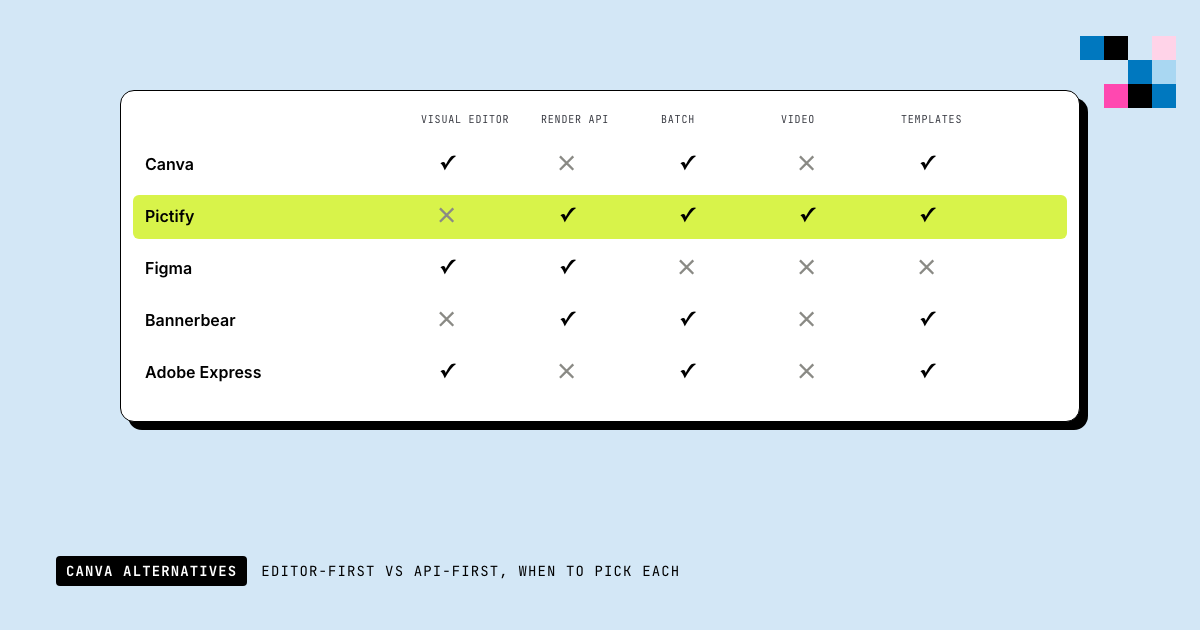
1. Visual editor + rendering API. You design templates in a drag-and-drop canvas (same ergonomics as Canva), bind variables, and call one endpoint to render any number of variations. This is what most teams actually want when they outgrow Canva: they still need a designer-friendly editor, they just also need the API. Pictify, Bannerbear, Placid, Renderform, Abyssale live here. Htmlcsstoimage fits in an API-only sub-category without a visual editor.
2. Design tools with APIs bolted on. They started as Canva-style editors and later shipped a programmatic layer. Good if your team has non-technical designers and engineers sharing the same assets. Canva itself has an API now. Figma has a REST API. Polotno is the open-source version.
3. Self-hosted headless browsers. Puppeteer, Playwright, Chromium. You own the runtime. Maximum control, maximum ops burden. Fine for a side project, expensive at 10K+ renders/day.
4. Static graphics libraries. satori (Vercel's HTML→SVG converter), sharp, canvas, pdfkit. Low-level. Fast. Excellent for OG images and simple product images where you don't need a designer in the loop.
Most "canva alternatives free" lists blend all four into one ranked list. That's useless: these categories solve different problems and their price curves look nothing alike. Below I group by category and only rank within the group.
Category 1: Visual editor + rendering API (the real Canva replacement)
If your problem is "we need to generate images programmatically from a template and some data, and a designer still wants to edit that template visually," this is your category. Every tool here offers:
- A drag-and-drop template editor (the Canva-style part).
- An HTTP API that renders the template with variables.
- Variable substitution: `
{{title}}`, `{{user.avatar}}`, etc. - Batch rendering, webhooks, SDKs, or all three.
They differ on editor ergonomics, pricing, rendering engine, and how much logic the template itself can do.
Pictify
What it is: a visual template editor with a rendering API, a real expression engine, live data bindings, a built-in A/B experimentation layer, and an agentic AI copilot. It covers the whole pipeline from "designer builds a template" to "backend renders personalized variations at whatever volume the business throws at it," not just the render step.
Most lists that put Pictify next to Bannerbear or Placid describe it as "an HTML-to-image API." That's the smallest thing it does. The editor, the expression language, and the data layer are where it actually competes.
The visual editor. A full canvas editor built on FabricJS: layers, snapping, alignment, grouping, multi-select, undo/redo, pages (for multi-page PDFs), a layers panel, and a component library with text presets, shapes, icons, stock photos, QR codes, charts, and data tables as first-class elements. Templates are designed visually, but every canvas object can be swapped to raw HTML via a dedicated HTML element when you need CSS you can't express in the UI.
Variables are a typed system, not just placeholders. Pictify templates declare variables with types (text, image, color, number, boolean), and the Variables panel in the editor exposes them as a schema your API callers have to respect.
A real expression engine. Not string interpolation. A tokenizer + evaluator with built-in functions and filters:
{{ price * 0.9 | currency }}
{{ user.name | uppercase }}
{{ if length(items) > 0 }}
  {{ items[0].title | capitalize }}
{{ else }}
  Coming soon
{{ endif }}
Built-in functions include length, isEmpty, isNotEmpty, contains, uppercase, lowercase, capitalize, currency, array helpers, and number formatting. Conditional blocks, nested lookups, and per-element expressions all work in the editor and at render time. This is the single biggest delta against Bannerbear and Placid, which treat variables as plain string replacement.
Live data bindings. Templates can bind to external data sources (HTTP endpoints, webhooks, or static JSON) through the Data Sources + Bindings API. A binding can be refreshed, tested, paused, or resumed. Pair that with a scheduled render and you have automated image generation that keeps up with a dashboard, a product catalog, or a leaderboard without any application code in between.
A/B testing on images, natively. The Experiments feature lets you define variants of a template, assign traffic splits, track experiment_events for impressions/clicks/conversions, and declare a winner from the analytics dashboard. You don't need to ship images to a separate experiment platform; the rendering API knows which variant to return.
AI copilot (agentic, not a single-shot generator). Multiple copilot modes live in the backend (copilot-agentic, copilot-swarm, copilot-v2) that can generate full templates from a prompt, suggest variants, rewrite copy, and edit existing templates step by step. "Make a holiday variant," "resize this for LinkedIn," "generate 5 background variations" all happen inside the editor.
Multi-format output, one API. PNG, JPEG, WebP, single-page PDF, multi-page PDF (a real one, not images stitched together), and GIF: same template, different endpoint or fileExtension. The PDF renderer outputs native text (not rasterized images), the GIF renderer captures animated canvases, and the roadmap goes from GIF to video.
Integrations that exist, not just "coming soon." Figma plugin (publish Figma designs as Pictify templates), Zapier, Make, webhook subscriptions, custom storage to S3 / Google Cloud / Cloudinary / ImageKit for outputs, RapidAPI distribution, and an API playground inside the dashboard for testing every endpoint without a client.
Teams, roles, and brand assets. Multi-user teams with roles, shared templates, a brand-assets library (colors, fonts, logos reused across templates), per-team API tokens, activity logs, and per-team quotas. Bannerbear has teams. Placid has teams. The difference is Pictify ships brand assets and shared variable schemas, so design tokens don't drift across templates.
Other engineering niceties worth naming:
- Background removal as a first-class operation on any image element.
- Batch rendering with async jobs, webhook on completion, and a jobId you can poll.
- URL screenshots as a separate endpoint when you need to render someone else's page, not HTML you wrote.
- Per-platform presets (Instagram, Twitter, LinkedIn, OG, etc.) exposed as dimensions on the same template.
- HTML/CSS escape hatch for anything the editor can't express: a single HTML element inside an otherwise-visual template.
Typical workflow. A designer builds a template once in the editor. An engineer wires the backend to POST variables, or sets up a data binding and a schedule. Marketing gets Experiments for variant testing. Ops gets webhooks and batch jobs. Finance gets one line item.
# Render a saved template with variables: this is the 80% case
curl -X POST https://api.pictify.io/template/tpl_abc123/render \
  -H "Authorization: Bearer $PICTIFY_API_KEY" \
  -H "Content-Type: application/json" \
  -d '{
    "variables": {
      "title": "Shipping at scale",
      "price": 49,
      "featured": true,
      "avatar": "https://example.com/jane.png"
    }
  }'
Batch render a whole campaign:
const res = await fetch("https://api.pictify.io/template/tpl_abc123/batch", {
  method: "POST",
  headers: {
    Authorization: `Bearer ${process.env.PICTIFY_API_KEY}`,
    "Content-Type": "application/json",
  },
  body: JSON.stringify({
    variables: users.map((u) => ({
      name: u.name,
      avatar: u.avatarUrl,
      plan: u.plan,
    })),
    webhookUrl: "https://yourapp.com/hooks/pictify-batch",
  }),
});
const { jobId } = await res.json();
Or skip the editor entirely when a one-off HTML render is faster:
curl -X POST https://api.pictify.io/image \
  -H "Authorization: Bearer $PICTIFY_API_KEY" \
  -H "Content-Type: application/json" \
  -d '{
    "html": "<div style=\"width:1200px;height:630px;background:#0f172a;color:#fff;display:flex;align-items:center;justify-content:center;font-family:Inter;font-size:64px;\">Hello from code</div>",
    "width": 1200,
    "height": 630,
    "fileExtension": "png"
  }'
Best for: teams who want Canva's ergonomics for the design step, a real expression engine and live data inside templates, A/B testing on rendered images, and a single API that covers static images, multi-page PDFs, and GIFs. Outsized value at the >1,000-renders/day mark, where the bindings + experiments layer stops being "nice-to-have" and starts replacing a whole internal pipeline.
Bannerbear
What it is: the category veteran. Visual template editor, template-based rendering API, solid SDKs across Node, Ruby, Python, and PHP. Strong template marketplace. Very good for straightforward social media graphics at scale.
Where it differs from Pictify:
- **Variables are "modifications": plain string replacement.** No expression engine, no conditionals, no filters. If you need `
{{price * 0.9 | currency}}` or an if/else block, you do the math in your backend and pass the final string. - No native data bindings. You fetch the data, you POST it on every render. There's no first-class "template connected to a live URL" concept.
- No built-in A/B experiments on images. You ship variants manually and track them in a separate analytics tool.
- No HTML escape hatch. Everything is canvas layers; if the editor can't express it, you can't do it.
- AI is single-shot. Bannerbear has AI image generation for backgrounds; it does not have an agentic copilot that edits templates for you.
None of this makes Bannerbear a bad choice; it's fast, stable, well-documented, and the SDKs are genuinely excellent. It's the right answer when your templates are straightforward ("headline + subtitle + image") and you don't need logic inside them. It's the wrong answer when your templates have conditional blocks, price math, data from live endpoints, or A/B tests riding on them.
// Bannerbear node SDK
import Bannerbear from "bannerbear";
const bb = new Bannerbear(process.env.BANNERBEAR_API_KEY);

const image = await bb.create_image("template_id", {
  modifications: [
    { name: "title", text: "Shipping at scale" },
    { name: "author_name", text: "Jane Doe" },
    // no expressions here; pre-format numbers/strings in your backend
    { name: "price", text: `$${(price * 0.9).toFixed(2)}` },
  ],
});
Placid
What it is: similar to Bannerbear: canvas-based editor, template API. Known for its Figma and Sketch imports.
Tradeoffs: pricing tiers get steep at higher volumes. No expression engine: any non-trivial formatting has to happen in your backend before you call the API.
Htmlcsstoimage
What it is: the minimalist option. No template editor; you always send raw HTML and CSS. Stateless.
Tradeoffs: because there's no template system, you're on your own for reuse. Every caller has to manage its own HTML. Fine if you're a one-person side project. Painful once a design team exists.
Renderform
What it is: another Bannerbear-style engine. Template editor, modifications API.
Tradeoffs: smaller ecosystem than Bannerbear. Often chosen on price.
Abyssale
What it is: multi-size rendering. You design once, render across Instagram, Twitter, LinkedIn, email header, etc., from one template.
Tradeoffs: the multi-size logic is genuinely good; most other tools make you design each size by hand. But the API surface is smaller than Bannerbear or Pictify.
Quick comparison: category 1
| Tool | Visual editor | Expression engine | Conditionals | Live data bindings | A/B experiments | Outputs | AI copilot |
|---|---|---|---|---|---|---|---|
| Pictify | Yes (+ HTML escape hatch) | Yes (tokenizer + functions + filters) | Yes | Yes (HTTP / webhook / static) | Yes (native) | PNG, JPG, WebP, PDF (multi-page), GIF | Yes (agentic) |
| Bannerbear | Yes | No (string replacement) | No | No | No | PNG, JPG, GIF, MP4 | AI backgrounds only |
| Placid | Yes | No | No | No | No | PNG, JPG, PDF | No |
| Renderform | Yes | No | No | No | No | PNG, JPG, PDF, GIF, MP4 | No |
| Abyssale | Yes (multi-size) | No | Limited | No | No | PNG, JPG, HTML | No |
| Htmlcsstoimage | No | n/a (you write HTML) | n/a | No | No | PNG, JPG | No |
Category 2: Design tools with an API layer
This is what most "software similar to canva" lists actually mean. If a non-technical designer already owns the asset, these are the paths of least resistance.
Canva itself (the Canva API)
Canva shipped a Connect API in 2024. It lets you trigger template renders from your backend. If your team already lives in Canva, this is the shortest path: you keep the editor, you add the endpoint.
Tradeoffs: the API is rate-limited, template access is scoped to what you designed in Canva, and you're paying for every seat + every render. If you need 100,000 renders/month, the math gets unpleasant. This is Canva's own moat, not the path Canva alternatives try to replace.
Figma (via the Figma REST API)
For teams that design in Figma, you can export frames as PNG/SVG via the REST API. Combine with figma-api-exporter or similar libraries for automation.
const res = await fetch(
  `https://api.figma.com/v1/images/${fileKey}?ids=${frameId}&format=png`,
  { headers: { "X-Figma-Token": process.env.FIGMA_TOKEN } }
);
const { images } = await res.json();
// images[frameId] is a short-lived S3 URL
Tradeoffs: Figma frames don't support template variables. If you need dynamic text, you're building a pipeline that mutates the Figma file before export. It works but it's a workflow, not a product.
Polotno Studio (open source)
What it is: an open-source, self-hosted design editor with a JS API. Canvas-based. The closest thing to "open source canva alternative" that actually exists as a full editor.
Tradeoffs: you own the hosting, you own the upgrades, you own the bug reports. Great if you want a white-label editor inside your own SaaS. Not a drop-in replacement for a rendering API.
VistaCreate, Crello, Piktochart (the "apps like canva free" crowd)
These are end-user design tools. They'll appear on every "free websites like canva" list and in "companies like canva" searches. They do not solve the automation problem; they solve the "I want a free Canva" problem. Mentioned here so you can rule them out quickly: if you found this article by searching "free apps like canva," you want category 2's design-tool options; if you searched "render images programmatically," you want category 1.
Category 3: Self-hosted headless browsers
Puppeteer / Playwright
What it is: you run Chromium in your own infrastructure and screenshot rendered HTML. Full control, zero vendor lock-in.
import puppeteer from "puppeteer";

const browser = await puppeteer.launch();
const page = await browser.newPage();
await page.setViewport({ width: 1200, height: 630 });
await page.setContent(`
  <div style="width:1200px;height:630px;background:#0f172a;color:#fff;display:flex;align-items:center;justify-content:center;font-family:sans-serif;font-size:64px;">
    Hello from code
  </div>
`);
await page.screenshot({ path: "out.png" });
await browser.close();
When this is right: you're sensitive to data residency, your volume is low, or you already run browser-automation infra for scraping/testing. The marginal cost of adding image rendering is small.
When this is wrong: your volume is growing. A single Chromium instance uses 500MB–1GB RAM under load. At 10 RPS you need a pool. At 100 RPS you need a fleet, a queue, warm-up logic, and monitoring. This is the "we built our own" trap: you end up rebuilding the rendering APIs in category 1, badly.
Our full breakdown of this tradeoff is in HTML to Image: The Complete Developer Guide.
Category 4: Static graphics libraries
satori (Vercel)
What it is: a library that converts a subset of HTML/CSS into SVG, which you then rasterize. No browser involved. Extremely fast: milliseconds, not seconds.
import satori from "satori";
import { Resvg } from "@resvg/resvg-js";

const svg = await satori(
  <div style={{ display: "flex", background: "#0f172a", color: "#fff", width: 1200, height: 630, alignItems: "center", justifyContent: "center", fontSize: 64 }}>
    Hello from code
  </div>,
  { width: 1200, height: 630, fonts: [{ name: "Inter", data: fontData, weight: 400, style: "normal" }] }
);

const png = new Resvg(svg).render().asPng();
Tradeoffs: satori supports a subset of CSS. No position: absolute in most contexts, no CSS grid, limited pseudo-elements. If your OG image is "text on a gradient," satori is the right call. If it's "hero + four product photos with shadows and conditional badges," you'll end up back in category 1.
sharp, node-canvas, pdfkit
Low-level image/graphics libraries. You compose images pixel-by-pixel or with primitives. Useful for thumbnails, overlays, and PDF output. Overkill for template-driven generation.
A decision framework
Pick from the category that matches your actual constraint, not the one with the shiniest landing page.
Pick visual editor + API (Pictify, Bannerbear, Placid, Renderform, Abyssale) when:
- A designer (or you) wants to build templates visually, not in code.
- Your templates have variables and you'll render many variations.
- You don't want to run browser infrastructure.
- Volume is between 100/day and 1M/month.
Pick API-only (Htmlcsstoimage, or pure Pictify HTML mode) when:
- There's no designer in the loop; everything is code already.
- You want the thinnest possible abstraction: HTML in, image out.
Pick a design tool with an API (Canva API, Figma, Polotno) when:
- A non-technical designer owns the asset.
- The design changes weekly but data changes rarely.
- You can tolerate the rendering being a workflow, not a single call.
Pick self-hosted headless browsers (Puppeteer/Playwright) when:
- You have strict data residency requirements.
- You already run browser infra for other reasons.
- Volume is low (< 1K/day) and stable.
Pick static libraries (satori) when:
- You're on Vercel/Cloudflare and want edge rendering.
- Designs are simple (text, gradients, maybe one image).
- You want sub-100ms p95 render time.
When in doubt, start in category 1. The "build vs. buy" math almost always favors buy for the first 12 months; by the time you've built a Chromium fleet, you've spent more than three years of an API subscription. The people who say "just use Puppeteer" are usually the ones who don't have to run it.
"What is better than Canva?" (the honest answer)
Nothing is better than Canva at being Canva. Canva won the "consumer drag-and-drop design tool" SERP and it's not giving it back.
But Canva is not competing with any of the tools above. These solve the adjacent problem: you have data, and you need an image that reflects it, without a human in the loop. Canva's workflow has a human at the center. Everything in this article removes that human.
If that's your problem (and if you're reading a piece called "Canva alternatives for developers," it probably is), then the real question isn't "what replaces Canva." It's "what category fits my constraint." Answer that first. The specific tool is a detail.
Get started with Pictify
If category 1 is where you land, Pictify is the shortest path from "designer finished a template" to "image in production."
- Free tier: sign up.
- Comparison pages: vs. Bannerbear, vs. Placid, vs. Htmlcsstoimage, vs. Renderform.
- Interactive tools: HTML to PNG, URL to Image, OG Image Generator, Certificate Generator.
- Deep dives: HTML to Image: The Complete Developer Guide, HTML to GIF.
FAQ
Is there a free Canva alternative for developers?
Yes. In the API-first category, Pictify and Htmlcsstoimage offer generous free tiers. For category 4 (static libraries), satori is MIT-licensed and runs in your own code for free.
What is the best open-source Canva alternative?
Polotno Studio is the closest full-featured open-source design editor. For programmatic rendering without an editor, satori is the leading open-source option. For self-hosted browser rendering, Puppeteer and Playwright.
What are apps similar to Canva that developers actually use?
Day to day, developers use Figma to design and one of Pictify, Bannerbear, or Placid to render from code. The design tool and the rendering engine are usually different products (unlike Canva, which tries to be both).
What is better than Canva for scale?
Any of the category 1 tools, because they were built for scale from day one. Canva's API exists but its pricing and rate limits reflect its origin as a consumer tool.
Is Canva open source?
No. Canva is a closed-source commercial product. Polotno Studio is the closest open-source equivalent on the editor side; satori is the closest on the programmatic side.
Are there free websites like Canva I can use for this?
For occasional design work, yes: VistaCreate, Crello, and Adobe Express are the usual answers. For programmatic use, "free website like Canva" is the wrong category entirely. You want an API, not a website.
What platforms like Canva have the best API?
Ranked by API depth: Pictify, Bannerbear, Placid, Renderform, Abyssale. Canva's own Connect API is capable but rate-limited and expensive per render at volume.
Ship documents, images and video from one template.
50 renders a month on the free tier. No card, no watermark.
Start free