
Introduction
User-generated content (UGC) is a powerful tool for marketers. It can help you build brand awareness, increase engagement, and drive conversions. But creating a successful UGC campaign isn’t always easy. In this post, we’ll share some tips and best practices for leveraging user-generated content to achieve your marketing goals.
What is user-generated content?
User-generated content is any form of content that is created by users of a product or service. This can include photos, videos, reviews, social media posts, and more. UGC is a powerful marketing tool because it is authentic, relatable, and trustworthy. Consumers are more likely to trust recommendations from other consumers than they are from brands.
Examples -:
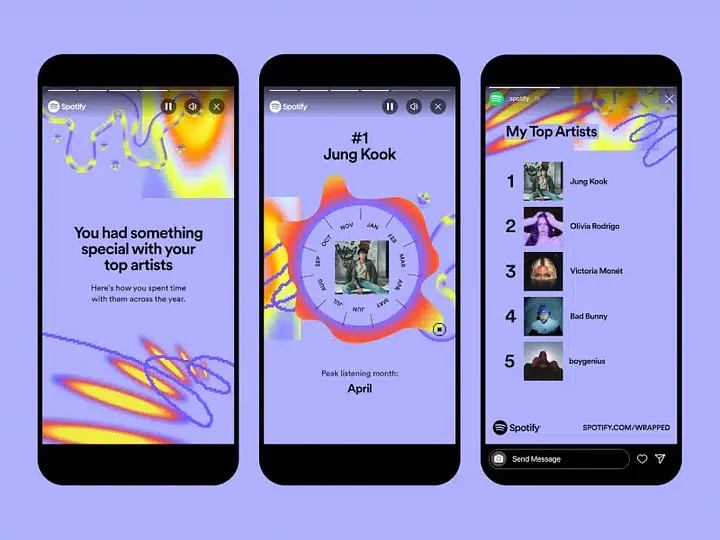
Spotify Wrapped
LEGO Challenge

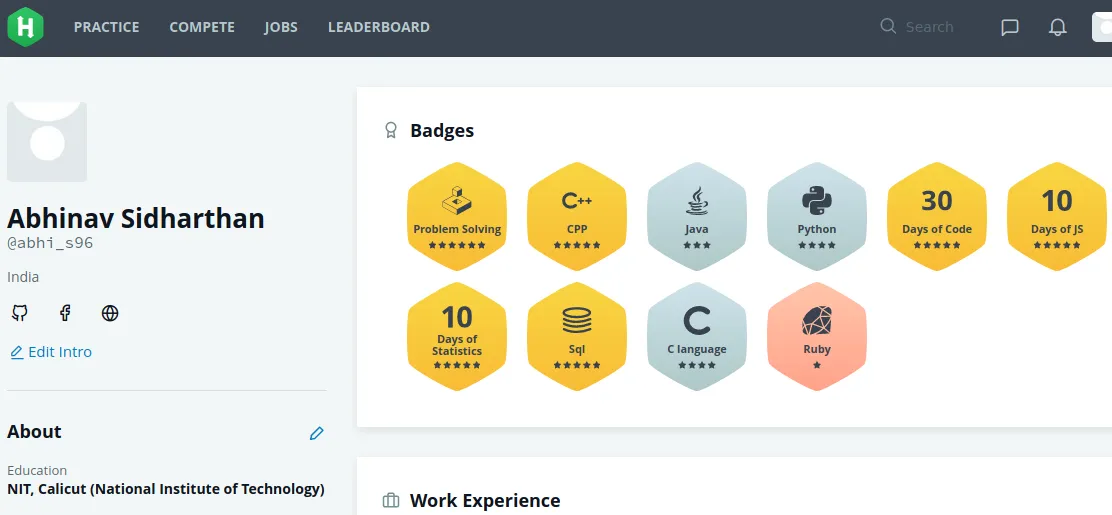
HackerRank Badges
Why is user-generated content important?
User-generated content is important for a number of reasons. First and foremost, it can help you build trust with your audience. Consumers are more likely to trust recommendations from other consumers than they are from brands. UGC is also a great way to increase engagement with your audience. When consumers see themselves reflected in your marketing materials, they are more likely to engage with your brand.
How to create a successful user-generated content campaign
Creating a successful user-generated content campaign requires careful planning and execution. Here are some tips to help you get started:
- Set clear goals: Before you launch your UGC campaign, it’s important to define your goals. Are you looking to increase brand awareness? Drive conversions? Build trust with your audience? Once you have a clear goal in mind, you can tailor your campaign to achieve it.
- Choose the right platform: There are many platforms where you can host your UGC campaign, including social media, your website, and third-party review sites. Choose a platform that makes sense for your brand and your audience.
- Incentivize participation: To encourage users to create and share content, consider offering incentives like discounts, prizes, or exclusive access to new products.
- Monitor and measure: Once your campaign is live, it’s important to monitor its performance and measure its impact. Track key metrics like engagement, reach, and conversions to see how well your campaign is performing.
- Engage with your audience: Finally, don’t forget to engage with your audience throughout your campaign. Respond to comments, thank users for their contributions, and share their content to show your appreciation.
How to measure whether a UGC campaign is actually working
"Track engagement" isn't a metric, it's a wish. Here's what to actually watch:
- Submission rate: how many people who saw the ask actually created content, out of total viewers or participants. A campaign asking for photos on a product page might see a 1-3% submission rate; a branded hashtag challenge with an incentive can push higher. If submissions are near zero, the ask is unclear or the incentive is too weak; fix that before scaling spend.
- Engagement rate on UGC vs. brand content: UGC posts on Instagram and TikTok routinely outperform brand-produced content on saves, shares, and comments, because they read as real rather than staged. If your UGC isn't beating your own content on engagement, something's off with selection or framing, not the format itself.
- Conversion lift: run UGC-featuring product pages against a control without it. Even a simple A/B test (a UGC gallery vs. no gallery on the same product page) will tell you whether it's actually moving purchase decisions, not just vanity metrics.
- Cost per acquisition vs. paid content: UGC campaigns cost incentive budget plus moderation time, not production budget. Compare CPA on a UGC-driven channel against a paid content channel over the same period. This is usually where UGC wins, since you're not paying a studio day rate per asset.
Pick two or three of these before launch, not after. Retrofitting measurement onto a campaign that's already live means you're guessing at baseline.
The part that actually breaks at scale: turning submissions into consistent assets
The tips above assume you can collect UGC. The part that quietly kills most campaigns is what happens after: fifty photos come in over a weekend, and someone on the team spends Monday manually cropping, adding a brand frame, and resizing each one for Instagram, a story, and a website banner: three sizes, times fifty images, times however many weeks the campaign runs.
That's not a creative problem, it's a rendering problem, and it's the kind of thing that should be automated rather than done by hand in an image editor. A template defines the brand frame, the logo placement, and the layout once; each new submission (an image URL plus a username, say) gets sent to a rendering API and comes back as a finished, on-brand asset in the exact dimensions each platform needs. Pictify is built for exactly this: HTML/CSS template in, data out, image back, so "add our brand frame to every UGC submission at 1080x1080 for the feed and 1080x1920 for stories" becomes an API call instead of a design queue.
The same approach works for weekly or monthly UGC recap graphics. A "top 9 posts this month" collage is itself just a template with nine image slots, regenerated automatically instead of assembled by hand each time.
Get permission before you republish anything
Posting under a public hashtag doesn't automatically give you the right to repost commercially. Ask for explicit permission before featuring someone's content off-platform. A simple comment-and-reply confirmation is enough for most social reposting, but anything used in paid ads or on your website should have a documented release, even if it's just a checkbox on a submission form. It's a five-minute step that avoids a much longer one later.
Conclusion
User-generated content is a powerful marketing tool that can help you achieve your marketing goals. By following the tips and best practices outlined in this post, you can create a successful UGC campaign that builds trust with your audience, increases engagement, and drives conversions.